Fast Facts
- CVE-2026-21509 is a Security Feature Bypass vulnerability in Microsoft Office that allows malicious documents to bypass Kill Bit protections and load restricted OLE/COM components leading to unauthorized code execution.
- CVE-2026-21509 was disclosed in January 2026 and has been actively exploited in the wild, leading to its inclusion in CISA’s Known Exploited Vulnerabilities (KEV) catalog.
- Threat actors exploit CVE-2026-21509 using weaponized RTF and Word spearphishing attachments, requiring only the victim to open the document and no macros or additional interaction.
- APT28 has been observed exploiting CVE-2026-21509 in Operation Neusploit, targeting organizations in Central and Eastern Europe to deliver follow-on malware and establish persistent access.
.jpeg)


Overview
Microsoft disclosed CVE-2026-21509 in early January 2026 as part of an out-of-band security advisory after confirming active exploitation in the wild. According to Microsoft, the vulnerability was identified through coordinated threat intelligence reporting and internal telemetry indicating malicious Microsoft Office documents bypassing established security protections despite up-to-date systems and default configurations.
This vulnerability is classified as a Security Feature Bypass vulnerability affecting Microsoft Office’s handling of OLE (Object Linking and Embedding) and COM (Component Object Model) objects.
This flaw is a logic error in the application’s security decision flow. Specifically, it allows attacker-controlled document metadata to influence trust decisions before critical security enforcement checks are performed.
| Vulnerability Type | CWE Mapping | Attack Vector | User Interaction | Privileges Required |
|---|---|---|---|---|
| Security Feature Bypass | CWE-807 – Reliance on Untrusted Inputs in a Security Decision | Malicious Office document (RTF / DOCX) | Required: Opening the document | None |
This class of vulnerability is particularly dangerous because it does not rely on malformed input or crashes; instead, it subverts the intended order of security controls.
CVE Summary
With CVE-2026-21509 now listed in CISA’s Known Exploited Vulnerabilities (KEV) catalog and confirmed as actively exploited in the wild, organizations should treat any unpatched Microsoft Office and Microsoft 365 environment as being at significant risk of compromise. Exploitation relies on user interaction with a specially crafted Office document, allowing attackers to bypass built-in security protections and potentially enable follow-on payload execution.
CVSS & Impact Summary
| CVSS Score | Severity | Version | Vector String |
|---|---|---|---|
| 7.8 | High | 3.1 | CVSS:3.1/AV:L/AC:L/PR:N/UI:R/S:U/C:H/I:H/A:H/E:F/RL:O/RC:C |
How does CVE-2026-21509 this works?
To understand the impact of CVE-2026-21509, it is essential to understand the Kill Bit mechanism and its role in Office security.
The Kill Bit is a Windows registry–based control designed to permanently disable unsafe or deprecated COM / ActiveX components. Once a component is kill-bitted, it must never be instantiated regardless of application, trust level, or user configuration.
Kill Bits are stored under:
With the critical flag:

Registry evidence of an ActiveX/COM kill bit
This mechanism exists because many COM objects, particularly legacy Internet Explorer controls, have historically enabled arbitrary script execution, file access, and remote content loading.
In a secure, expected scenario, Microsoft Office follows a strict evaluation order when encountering an embedded OLE or COM object:
-
Parse the embedded object and extract its CLSID
-
Query the Kill Bit registry
-
If the CLSID is kill-bitted → block object instantiation
-
If not kill-bitted, apply secondary controls:
-
Macro policy
-
Protected View
-
Trust Center rules
-
-
Load the object only if all checks pass
In this model, the Kill Bit acts as an absolute veto; it overrides all other trust decisions. Even a fully trusted document cannot load a kill-bit component.
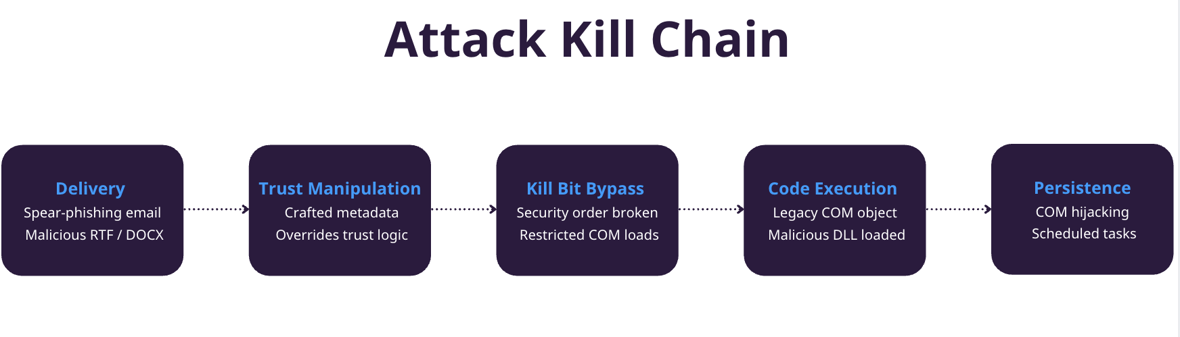
CVE-2026-21509 introduces a flaw in the ordering of security checks performed by Microsoft Office when processing embedded objects.
Due to improper trust evaluation logic, Office processes certain document-supplied metadata and flags before enforcing Kill Bit checks. These metadata fields, fully controlled by the document author, can signal that the embedded object originates from a trusted source or safe context.
As a result:
- Office prematurely classifies the embedded object as trusted
- The Kill Bit verification step is skipped or short-circuited
- Kill-bitted COM objects are instantiated anyway
In effect, untrusted document content is allowed to override system-level security policy.
Why does this matter?
CVE-2026-21509 does not introduce new exploit primitives; instead, it resurrects old ones.
By invalidating the Kill Bit’s authority, the vulnerability re-opens an attack surface that Microsoft intentionally closed years ago. Microsoft intentionally closed these attack surfaces between 2005 and 2014 through the Kill Bit mechanism following widespread ActiveX and Office OLE exploitation, as documented in security bulletins such as MS06-014, CVE-2012-0158 (MS12-027), and CVE-2014-6332, treating Kill Bits as permanent, system-level mitigations. This makes it especially attractive to advanced threat actors, who can leverage well-understood legacy components with predictable behavior and minimal exploit development effort.
In the campaigns analyzed by Zscaler, APT28 uses CVE-2026-21509 primarily as a reliable initial access mechanism delivered through targeted Spearphishing emails. The threat actors distribute malicious RTF or Word documents crafted to align with the recipient’s language and regional context. Once a victim opens the document, the exploit logic embedded within it enables Microsoft Office to load restricted legacy components, allowing the document to silently retrieve a malicious DLL from attacker-controlled infrastructure. Zscaler observed that this payload delivery is often gated through server-side filtering, ensuring that the malicious content is only served to intended targets while avoiding automated sandbox environments. This initial access technique allows APT28 to transition from document delivery to code execution without relying on macros, scripting engines, or explicit user interaction beyond opening the file.
In the first observed variant, exploitation of CVE-2026-21509 results in the delivery of MiniDoor, a lightweight and purpose-built dropper focused on email intelligence collection. After the malicious DLL is retrieved and executed, MiniDoor installs a malicious VBA macro project into Microsoft Outlook. This macro is designed to systematically collect email content from multiple folders, including Inbox, Drafts, and Junk, and forward the harvested data to attacker-controlled email accounts. To maintain persistence, the malware modifies the following Outlook registry settings to weaken macro security controls, ensuring that the malicious code continues to execute whenever Outlook is launched.
| Subkey | Value Name | Value | Description |
|---|---|---|---|
| HKCU\Software\Microsoft\Office\16.0\Outlook\Security | Level | 1 | Enables all macros in Microsoft Outlook. |
| Software\Microsoft\Office\16.0\Outlook\Options\General | PONT_STRING | 0x20 | Disables the "Content Download Warning" dialog box. |
| Software\Microsoft\Office\16.0\Outlook | LoadMacroProviderOnBoot | 1 | Ensures macro provider loads when the Microsoft Outlook application starts. |
In the second observed variant, exploitation of CVE-2026-21509 leads to the deployment of PixyNetLoader, a more advanced and modular loader designed to establish persistent remote access on the compromised system. After the malicious DLL is retrieved and executed by Microsoft Office, PixyNetLoader performs multiple preparatory actions to ensure long-term persistence and stealth. Unlike the MiniDoor variant, which is narrowly focused on email collection, PixyNetLoader acts as a staging framework that prepares the system for subsequent payload execution. The loader drops additional components to disk, including a loader DLL and an image file that contains encrypted shellcode concealed using steganography. At runtime, PixyNetLoader extracts and decrypts the embedded shellcode from the image file and executes it in memory, avoiding direct execution of suspicious binaries and reducing static detection opportunities.
To maintain persistence, PixyNetLoader leverages COM hijacking and scheduled task creation, ensuring that the malicious code is executed automatically upon system startup or user logon. In the observed cases, the malware modifies COM registry entries so that a legitimate COM class loads the attacker-controlled DLL instead of the intended system component. Additionally, PixyNetLoader creates a scheduled task masquerading as a legitimate system or application maintenance task, guaranteeing execution even if the initial infection vector is removed.
The Windows scheduled task is named OneDriveHealth and configured to launch the command below exactly one minute after the task is registered. The OneDriveHealth scheduled task launches the following command:
Once persistence is established, the final stage payload a Covenant “Grunt” implant is deployed, providing the threat actor with interactive command execution, file transfer, and further post-exploitation capabilities.
Persistence Mechanisms Observed in the PixyNetLoader Variant
| Subkey | Value Name | Value | Description |
|---|---|---|---|
HKCU\Software\Classes\CLSID\{CLSID} |
InprocServer32 |
Path to malicious DLL | Hijacks COM object execution to load attacker-controlled DLL. |
HKCU\Software\Classes\CLSID\{CLSID}\InprocServer32 |
(Default) |
EhStoreShell.dll |
Forces execution of the malicious loader when the COM class is invoked. |
HKCU\Software\Microsoft\Windows\CurrentVersion\Run |
<LegitimateName> |
Path to loader | Ensures execution at user logon (observed in some samples). |
Detecting CVE-2026-21509 with Logpoint
Required Log Sources
-
Windows
-
Process Creation with Command Line Auditing explicitly enabled
-
-
Windows Sysmon
-
Firewall
-
IDS/IPS
To detect activity associated with Operation Neusploit and similar Office-based exploitation chains, Logpoint customers can leverage a combination of existing alert rules for high-confidence detection and hunting queries to search for related behaviors across their environment proactively. The alert rules provide immediate visibility into well-defined malicious patterns such as suspicious child processes, scheduled task creation, macro abuse, and unsafe file drops. At the same time, the hunting queries allow analysts to uncover stealthier artifacts like COM hijacking, DLL sideloading, anomalous Office network activity, and payload staging that may otherwise evade point-in-time alerts. Together, these detections offer layered coverage across the attack lifecycle, from initial access through persistence and command-and-control.
Detections Rules
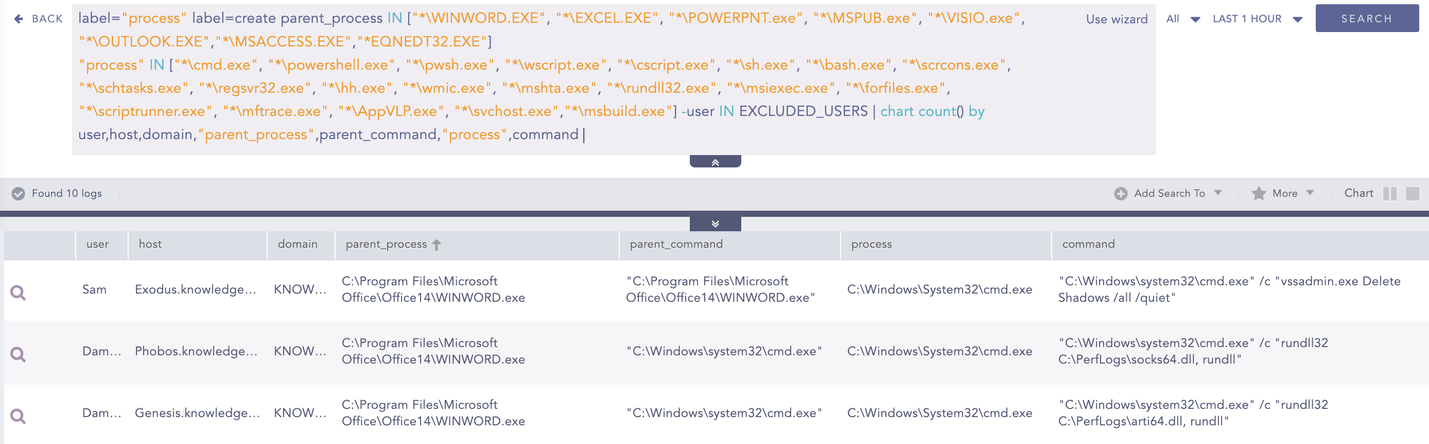
Suspicious Child Process Spawned by Microsoft Office Product
One of the key indicators of abnormal Office application behavior is the suspicious child processes spawned by Office applications. In the context of Operation Neusploit, malicious activity is initiated through Office documents and commonly transitions into the execution of system utilities such as cmd.exe, powershell.exe, schtasks.exe, and rundll32.exe. Monitoring for these process relationships provides an effective early-stage detection trigger, as Office applications are not expected to launch such binaries during normal operation.
Macro File Creation Detected
For detection purposes, customers can leverage the Macro File Creation Detected alert to identify the creation of macro-enabled Microsoft Office files, which are commonly abused by adversaries to execute malicious code.
When a macro-enabled Office document is opened, the corresponding macro file is created on the system. This activity can be detected using the following query
Scheduled Task Creation Detected
PixyNetLoader establishes persistence by using scheduled tasks to register a scheduled task named OneDriveHealth. After task creation, the malware follows a predictable restart-and-self-deletion sequence to reduce its on-disk footprint.
The Scheduled Task Creation Detected alert identifies scheduled task creation either through direct execution of schtasks.exe with task creation arguments while excluding known legitimate parent processes and users, or via registry modifications within the TaskCache registry path.
Suspicious Scheduled Task Creation
The Suspicious Scheduled Task Creation alert focuses on identifying scheduled tasks created from locations commonly abused by threat actors, helping to narrow the scope of threat hunting. This detection targets task creation events where the associated command originates from suspicious locations such as user directories, temporary folders, or ProgramData, while excluding known legitimate Windows Defender activity.
Outlook Security Settings Change
MiniDoor deliberately lowers Outlook macro security by setting the Security\Level registry value to 1, enabling unrestricted macro execution and allowing the dropped VBA project to auto-load without user interaction.
The Outlook Security Settings Change alert is designed to detect this behavior by monitoring registry value modifications that reduce Outlook’s macro security level. Specifically, it triggers when the Outlook macro security level is set to Level=1, which effectively disables macro protection and is a strong indicator of malicious persistence or execution attempts.
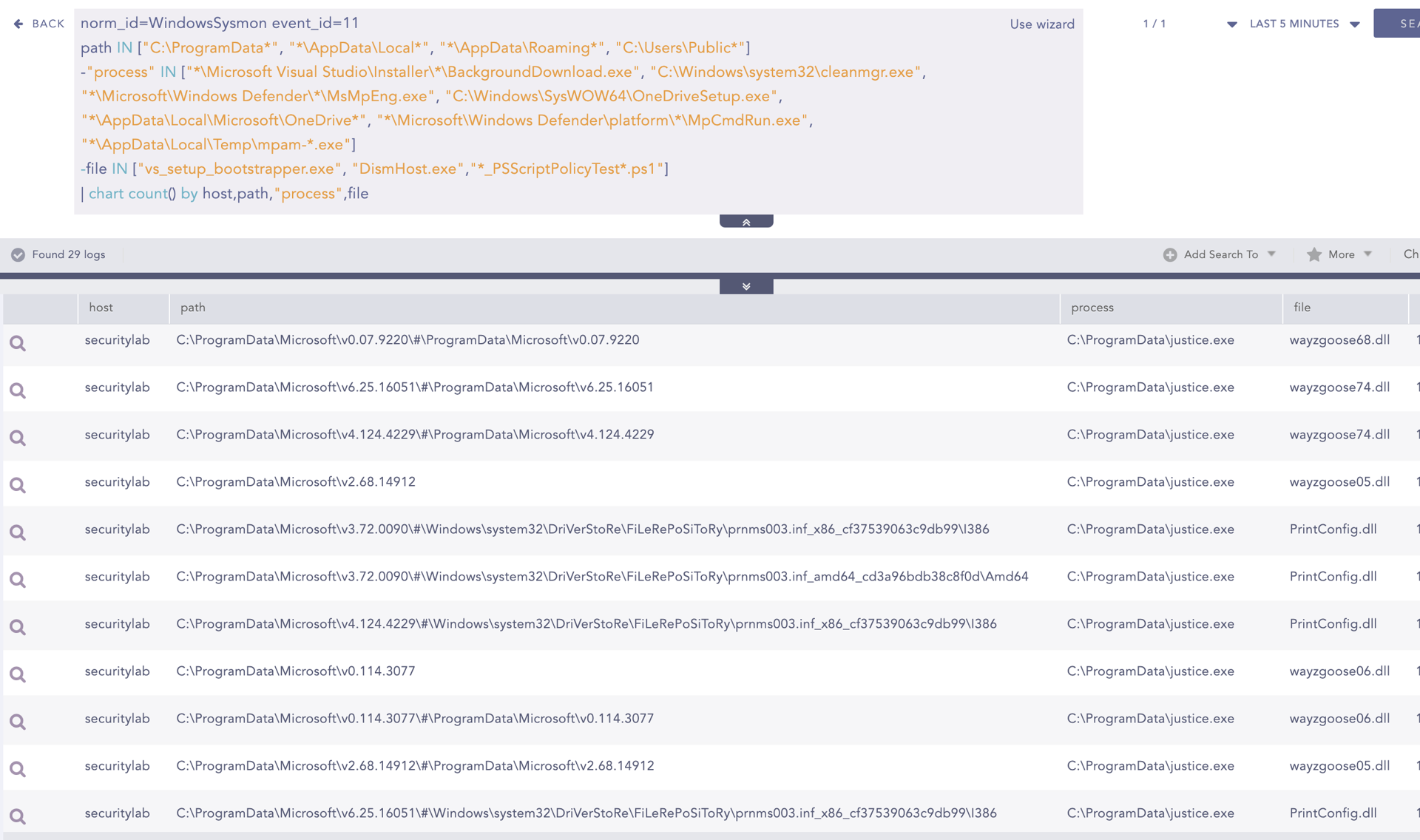
File Dropped in Suspicious Location
In attacks exploiting CVE-2026-21509, threat actors often use malicious Microsoft Office documents, such as weaponized RTF files, to achieve initial code execution. Once the exploit is triggered, additional payloads are commonly dropped onto disk to establish persistence or enable further malicious activity.
This alert helps detect this stage by monitoring file creation events in user-writable and commonly abused directories such as AppData, ProgramData, and Public. By filtering out known benign processes and file names, the alert highlights suspicious files that may be dropped as part of the exploitation or post-exploitation workflow, providing early visibility into suspicious activity
VBA DLL Loaded by Office
Exploitation of CVE-2026-21509 commonly involves malicious Microsoft Office documents, such as weaponized RTF files, that ultimately enable the execution of embedded VBA code. Once exploitation succeeds, Office applications load the Visual Basic for Applications (VBA) runtime components to execute the attacker-controlled macros or VBA projects, making VBA-related DLL loading a critical execution milestone in the attack chain.
This alert detects this behavior by monitoring image load events where Office processes load core VBA components and related libraries. When correlated with suspicious document delivery or exploitation activity, this alert helps confirm macro execution or VBA abuse following CVE-2026-21509 exploitation, providing strong evidence of malicious code execution within Office.
Hunting Query
The queries below are intended to support threat hunting by helping analysts identify indicators related to CVE-2026-21509 exploitation activity.
1. Hunt for Neusploit COM hijack
Operation Neusploit leverages a COM hijacking technique as a persistence and execution mechanism following successful exploitation of CVE-2026-21509. By registering a malicious DLL under a specific CLSID, the attacker ensures their payload is loaded whenever the associated COM object is instantiated. The use of a predictable CLSID and DLL path has been explicitly documented in Neusploit-related activity, making this behavior a high-confidence indicator of compromise.
This hunting query enables analysts to identify registry modifications that map a known Neusploit-associated CLSID to a malicious InProcServer32 DLL, including instances where the payload is stored in ProgramData or uses the known EhStoreShell.dll name. By detecting exact CLSID and DLL path combinations, the query helps surface COM hijacking attempts tied specifically to Neusploit, allowing analysts to quickly confirm persistence mechanisms and scope affected systems.
2. Generic COM hijack hunt (InProcServer32 pointing outside system folders)
Generic COM hijacking is a commonly abused persistence and execution technique observed inCVE-2026-21509 related activity, including Operation Neusploit. Following successful exploitation via malicious Office documents, attackers may register malicious DLLs under COM CLSIDs to ensure code execution when the COM object is invoked, even if the exact CLSID differs from known campaigns.
This hunting query helps analysts detect such activity by identifying InProcServer32 registry values that point to DLLs outside trusted system directories such as System32, SysWOW64, and Program Files. By surfacing COM registrations that resolve to user-writable or uncommon paths, the query enables analysts to uncover previously unknown or customized COM hijacking attempts used for persistence or stealthy execution.
3. Hunt for Neusploit OneDriveHealth Scheduled Task Persistence
In Operation Neusploit, threat actors establish persistence by creating a scheduled task named OneDriveHealth using schtasks.exe, often leveraging an XML task definition. This behavior occurs after successful exploitation of CVE-2026-21509 and is paired with a deliberate restart-and-cleanup routine terminating Explorer and deleting the task registration artifacts to reduce forensic visibility.
This hunting query enables analysts to identify both stages of the Neusploit persistence mechanism: the creation of the OneDriveHealth scheduled task and the subsequent command-line activity used to restart Explorer and delete task artifacts. By correlating schtasks.exe execution with the specific task name and cleanup commands, the query provides high-confidence detection of Neusploit-associated persistence and post-exploitation behavior.
4. Hunt for MiniDoor Outlook VBA project drop
In MiniDoor-related activity associated with CVE-2026-21509, attackers abuse Microsoft Outlook by dropping a malicious VBA project that is automatically loaded by Outlook at startup. By writing a malicious VbaProject.OTM file into the Outlook profile directory, the attacker gains persistent code execution without requiring further user interaction, especially after macro security settings are weakened.
This hunting query helps analysts identify the creation of VbaProject.OTM within Outlook-specific directories by monitoring file creation events. Since legitimate creation or modification of this file is rare outside of intentional macro development, detecting its appearance provides a strong indicator of malicious VBA persistence. When correlated with Outlook security setting changes or Office exploitation alerts, this query helps confirm successful post-exploitation and persistence via Outlook VBA abuse.
5. Hunt for Suspicious Outlook Startup and Macro Registry Changes
In campaigns exploiting CVE-2026-21509, attackers abusing Microsoft Outlook often go beyond simply lowering macro security settings to establish durable persistence. Additional Outlook-specific registry values can be modified to influence macro loading behavior and Outlook startup execution, enabling malicious VBA projects to be automatically loaded without further user interaction.
This hunting query enables analysts to detect registry value modifications associated with Outlook persistence mechanisms, including changes to macro security levels, macro provider loading behavior, and Outlook startup options. By monitoring these registry paths collectively, the query helps surface suspicious attempts to maintain persistence through Outlook configuration abuse, even when attackers avoid using a single, well-known registry key.
6. PixyNetLoader Artifact File Drop Artifacts
In APT28 campaigns linked to CVE-2026-21509, PixyNetLoader is used as a post-exploitation component to stage payloads and establish persistence. As documented in Neusploit-related activity, the loader drops a small set of distinctive files into predictable directories under ProgramData and Temp, which are later referenced for COM hijacking and scheduled task execution.
This hunting query enables analysts to identify file creation events associated with PixyNetLoader by monitoring for the drop of known loader-related artifacts, such as EhStoreShell.dll, SplashScreen.png, and office.xml, in their expected directories. Detection of these files provides high-confidence evidence of PixyNetLoader staging and can be used to quickly confirm compromise and scope affected systems when correlated with COM hijack or scheduled task alerts.
7. Hunt for Office Applications Initiating Network Connections Over Uncommon Ports
Analysts can use the following hunting query from SigmaHQ to hunt for outbound network connections initiated by Microsoft Office apps when they communicate over uncommon destination ports, excluding typical web/DNS/SMB and standard Outlook mail ports, to help surface potential C2 or evasion activity
8. Hunt for known malicious domains
Analysts can use the following query to hunt for activity associated with known indicators of compromise (IOCs).
Mitigation and response priorities
- Patch immediately, as the vulnerability is being actively exploited and emergency fixes are available.
- Actively look for these signs of attack:
- Creation of scheduled tasks that restart Explorer and then delete themselves
- Suspicious registry changes linked to COM hijacking (the documented CLSID)
- Outlook security changes that lower macro protections or auto-load macro providers
- Block or closely monitor connections to the known malicious domains wherever possible.
Conclusion
CVE-2026-21509 illustrates that "security feature bypass" vulnerabilities can enable full, multi-stage compromise when combined with delivery tradecraft and robust post-exploitation persistence. In Operation Neusploit, APT28 combines a weaponized RTF exploit with Outlook VBA persistence (MiniDoor) and COM hijacking scheduled tasks (PixyNetLoader), resulting in prolonged access and data theft.